
Help & FAQ
How to use your WSM Domains account in our new store. Log in at portal.wsmdomains.com. Click a question to see the answer.
New store | Logging in | Domains | Card & receipts | DNS & forwarding | Contact & privacy | Transfers | Expired | Security | Glossary
Our new store
What has changed with the move?
- Same login. Your username and password work as before. Forgotten it? Use Forgot Login on the login page.
- Your saved card moved with you, so auto-renew keeps working. Payments are processed by Stripe and show on your statement as WSM Domains (Adgrafix).
- Your domains and DNS records moved automatically. Websites and email keep working.
- Email forwarding keeps working. To add or change an email forward, contact support for now.
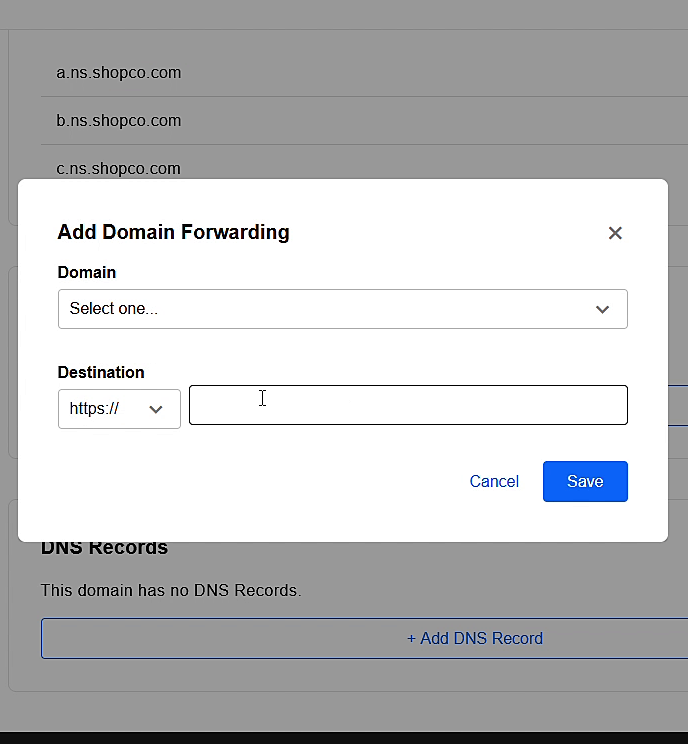
- Domain forwarding is now under each domain's Nameservers & DNS tab.
- New password rules apply when you set a new password (see below).
Do I need to do anything?
No. Everything moved for you. We suggest you log in once at the new store and check that your domains, auto-renew settings and saved card look right.
Logging in
How do I log in?
- Go to the login page, or click Manage Account - Login at the top of this site.
- Enter your username and password.
- You land on Your Domains.
I forgot my password. How do I set a new one?
- On the login page click Forgot Login.
- Open the email and click the link (it works for 1 hour).
- Choose a new password and click Reset Password.
Passwords need at least 14 characters, with an upper case letter, a lower case letter, a number and a special character. The ticks turn green as each rule is met.
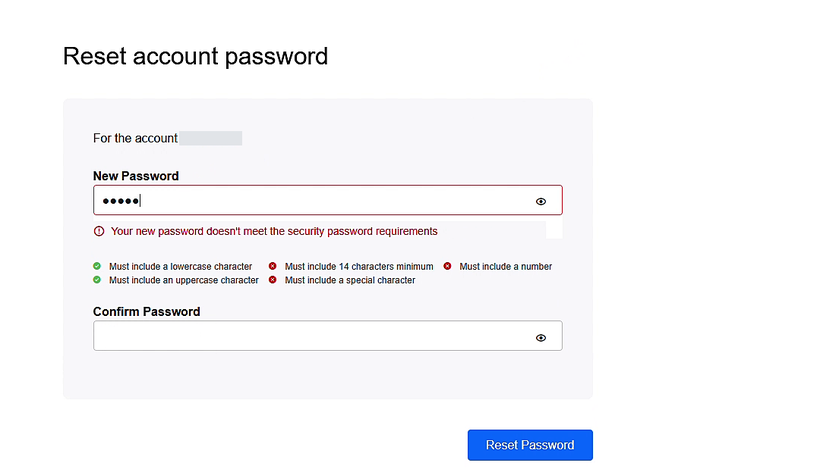
New customers get a Complete Your Account Setup email after their first order; the link opens this same page (the title says "Reset" - that is normal).
Your domains and renewals
Where do I see my domains and expiry dates?
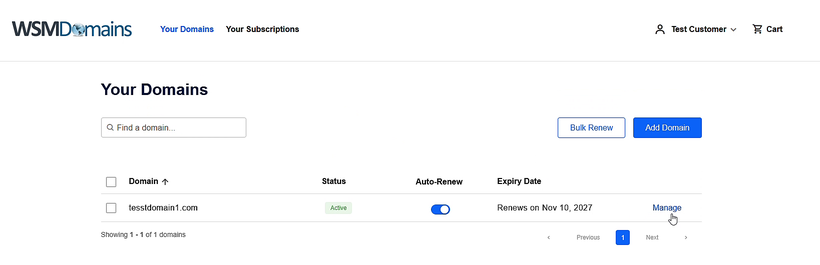
After logging in, Your Domains lists every domain with its status, auto-renew switch and renewal date. Click Manage to open a domain.
How do I turn auto-renew on or off?
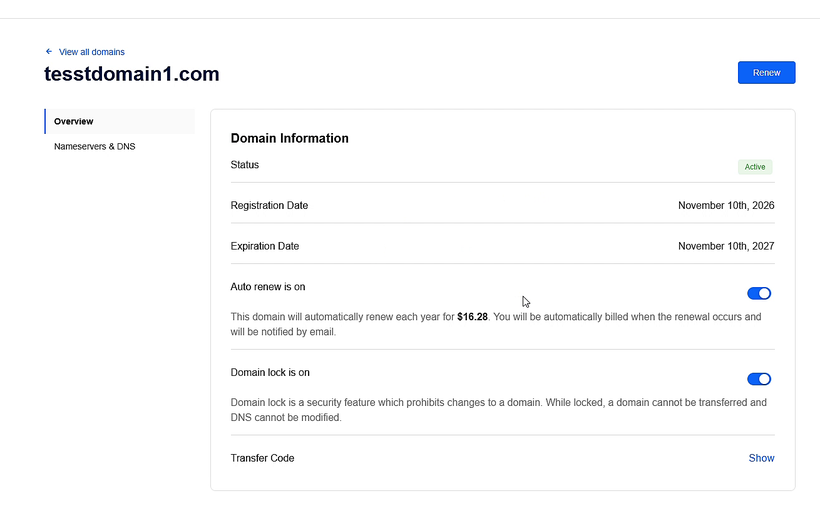
Use the switch in the Auto-Renew column of Your Domains, or open the domain and use Auto renew on its Overview. When it is on, your saved card is charged before the expiry date and we email you first.
How do I renew a domain now?
Open the domain and click Renew (top right), or tick several domains in Your Domains and click Bulk Renew. Then check out.
How do I register a new domain?
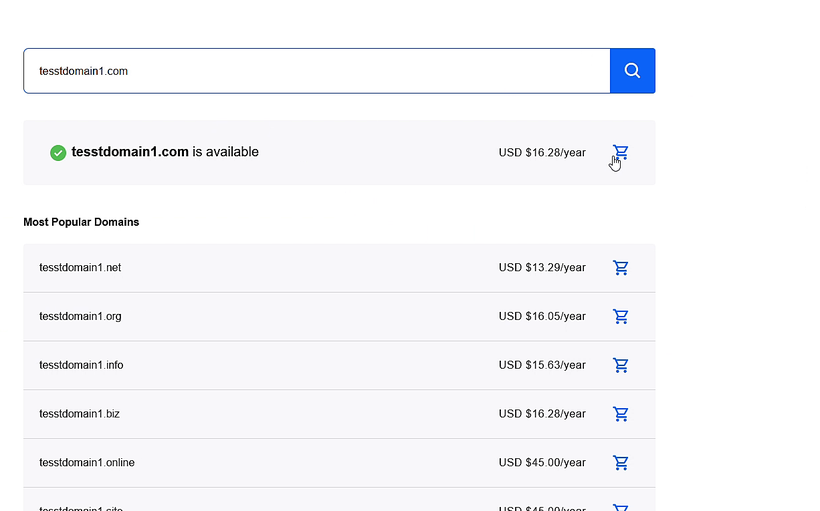
- Search for the name on the store homepage.
- Click the cart icon next to the domain you want.
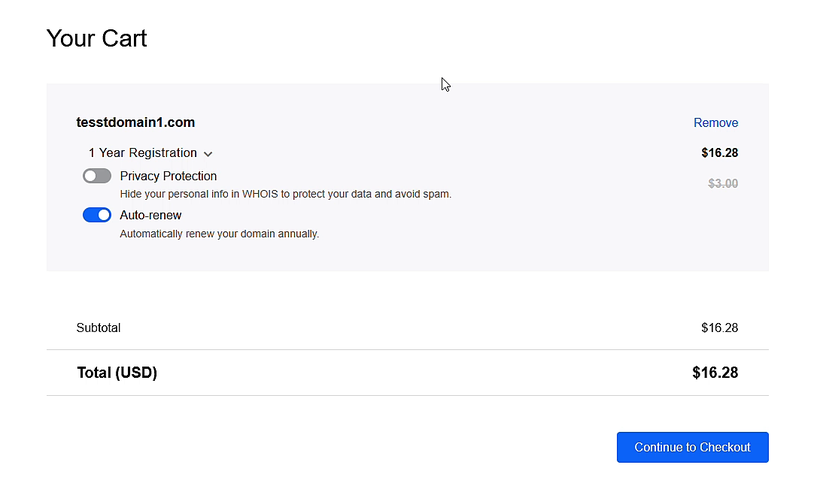
- In the cart choose the term, and switch Privacy Protection and Auto-renew on or off.
- Click Continue to Checkout, confirm the owner details and pay.
Card, orders and receipts
Where do I see my saved card and past orders?
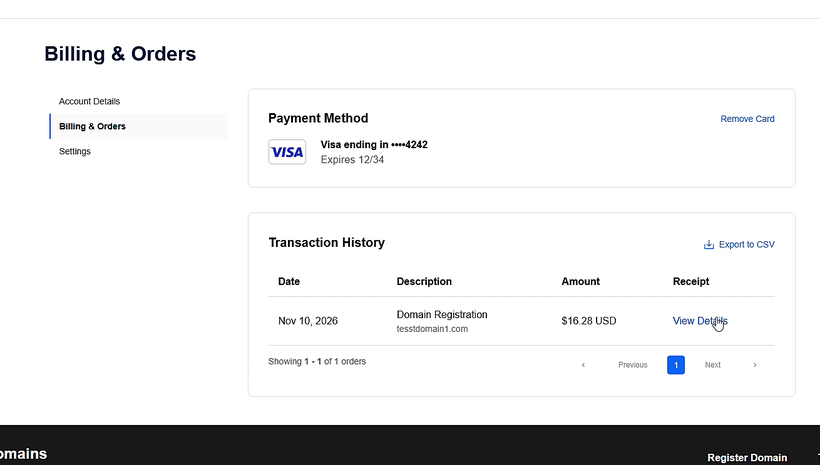
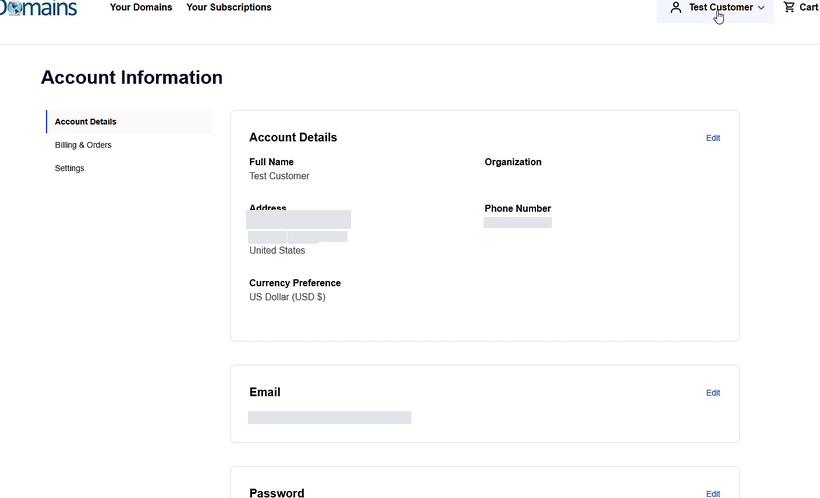
Click your name (top right), then Billing & Orders. Payment Method shows your saved card; Transaction History lists your orders.
How do I change my card?
Add the new card at your next checkout with Save as default payment method ticked, then click Remove Card on the old one. Please keep a card saved while auto-renew is on - without one your domains cannot renew.
How do I get a receipt?
In Billing & Orders, click View Details on the order, then Download Receipt. Export to CSV downloads your whole history. Prices are in US dollars (USD); see our Policies for refund and auto-renew terms.
Nameservers, DNS and forwarding
Where are my nameservers and DNS records?
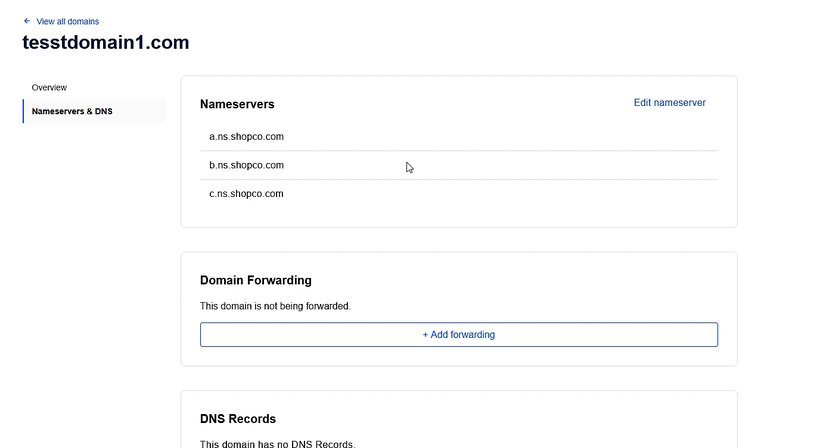
Open the domain (Manage) and click the Nameservers & DNS tab. It shows the nameservers, domain forwarding and DNS records.
How do I add or change a DNS record?
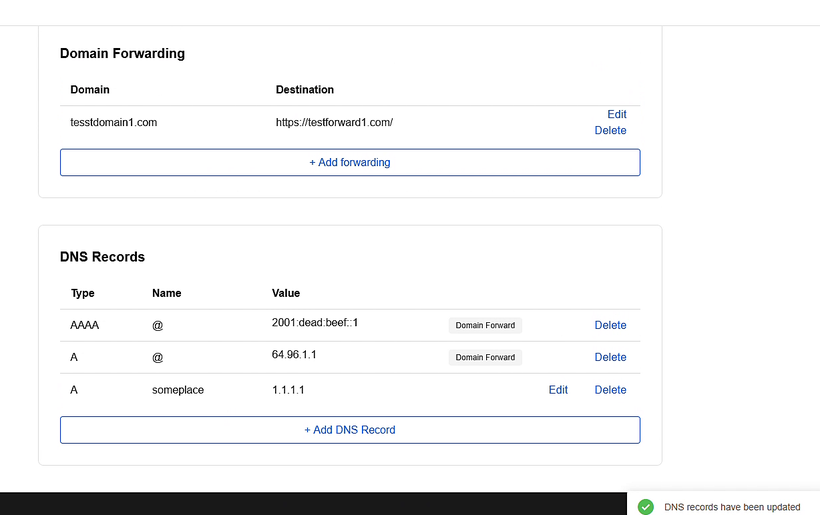
Click + Add DNS Record, enter the type, name and value, and save. Use Edit or Delete on an existing record. Records here only work while the domain uses our nameservers (a.ns.shopco.com, b.ns.shopco.com, c.ns.shopco.com).
How do I forward my domain to another website?
Click + Add forwarding, choose the domain, enter the destination address and click Save. This adds two records marked "Domain Forward"; delete the forward to stop it.
How do I use another host's DNS?
Click Edit nameserver and enter the nameservers your host gave you. Once changed, DNS records are managed at that host instead.
Why won't my changes save?
Switch off Domain lock on the domain Overview first, make the change, then switch it back on.
How do I add or change email forwarding?
Your existing email forwards keep working. To add or change one, email domainsupport@wsmdomains.com for now.
Contact details and privacy
How do I update the owner details?
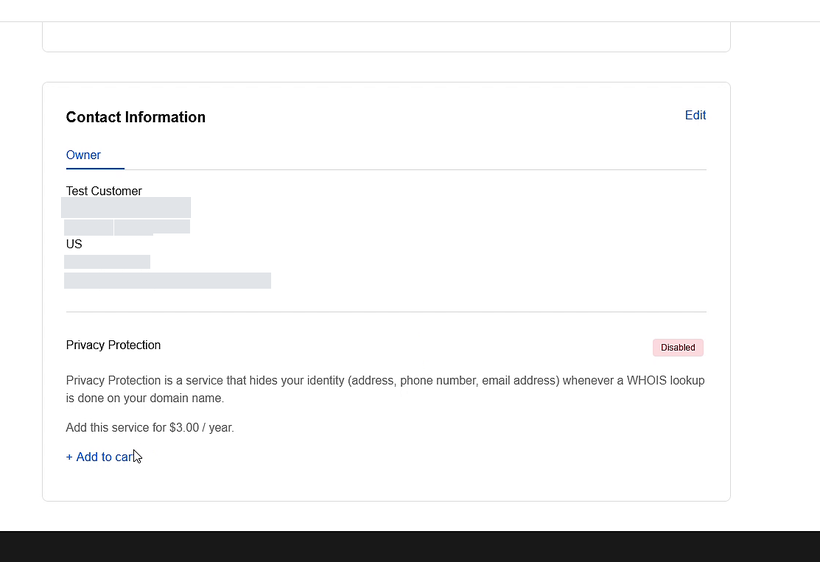
On the domain Overview, scroll to Contact Information and click Edit. A change of owner name or email can trigger a verification email you need to confirm.
How do I hide my details in WHOIS?
On the domain Overview, find Privacy Protection, click + Add to cart and check out.
Transfers
How do I transfer a domain to WSM Domains?
Unlock the domain at your current registrar and get its transfer (EPP) code. Then use Transfer a domain, enter the domain and code, and check out.
How do I transfer a domain away?
On the domain Overview switch off Domain lock, click Show next to Transfer Code, and give the code to your new registrar.
Renewals and expired domains
When is my card charged for renewal?
We email reminders before your domain expires and try to charge your saved card from 30 days before expiry.
My renewal failed or my domain expired. What now?
Log in, open the domain, click Renew and pay with a new card. An expired .com, .net or .org domain can usually still be renewed at the normal price for about 40 days; after that a redemption fee applies. Contact us as soon as possible.
Account security
How do I turn on two-factor authentication?
Click your name, then Settings, and choose Set up two-factor authentication. Scan the QR code with an authenticator app and keep the recovery codes safe.
How do I change my email, password or address?
Click your name, then Account Details, and use the Edit link next to each item.
Glossary
Domain terms explained
| Auto-renew | Your domain renews automatically before it expires, charged to your saved card. |
| DNS records | Settings that point your domain to a website (A record), email (MX record) or other services. |
| Domain lock | Protection that blocks transfers and DNS changes until you switch it off. |
| Domain forwarding | Sends visitors of your domain to another web address. |
| Grace period | Time after expiry when a domain can still be renewed at the normal price. |
| Nameservers | The servers that hold your domain's DNS records. |
| Privacy protection | Hides your personal details from the public WHOIS directory. |
| Redemption | Period after the grace period when restoring a domain costs an extra fee. |
| Registrant | The owner of the domain, shown in the domain's Contact Information. |
| TLD | The ending of a domain name, such as .com, .net or .org. |
| Transfer (EPP) code | A code that proves you own a domain, needed to move it to another registrar. |
| WHOIS | The public directory of domain registration details. |
Still need help?
Email domainsupport@wsmdomains.com or call 1-888-983-6600. We reply within 48 business hours. Our refund, auto-renew and privacy terms are on the Policies & Contact page.
